 Vintro Pro
NL · FR · EN
Vintro Pro
NL · FR · EN
Vintro Pro
NL · FR · EN
Vintro Pro
NL · FR · EN
You sell everything, so your list has to cope with everything. Furniture next to clothes next to books — in one stock, with one register underneath.

The hard part of a second-hand shop is not the quantity. It is that no two pieces are alike.
A wardrobe, a winter coat, a box of records and a coffee machine: four pieces, four kinds of information. The wardrobe needs dimensions, the coat a size, the records an artist and the coffee machine a test. A list with fixed columns becomes either too narrow for that or unworkably wide.
Vintro Pro lets you choose per category which fields take part. One stock, so one register and one margin overview — but the entry screen for a coat is not the one for a wardrobe.
Furniture, clothes, books, electricals, toys. You switch on the fields you need per category, and the rest stays out of the way.
Print to a Zebra or a portable bluetooth printer. At the sale you scan the code, so the price at the till is the price on the piece.
Purchase price and sale price are fixed per piece, so your margin falls out without having to keep categories apart. See the margin scheme and your register.
Which corner of the shop turns over, and which stands still. That is the question your layout should follow — see stock rotation.
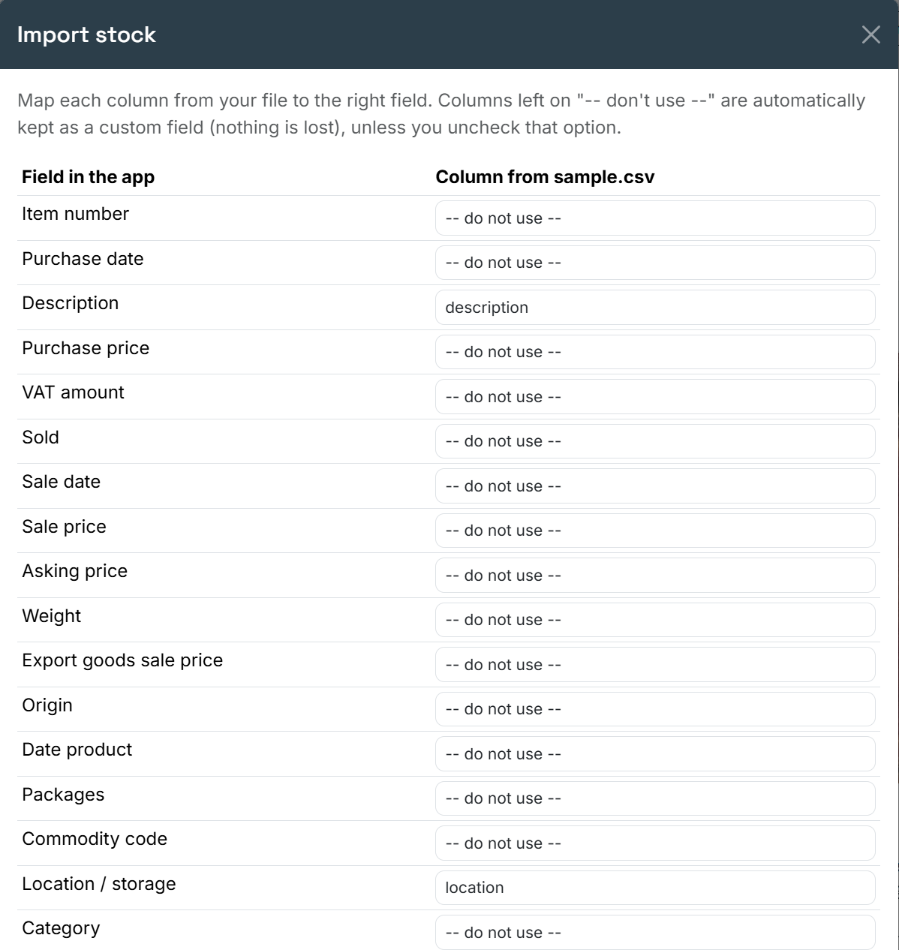
In the app: the category sits on every record, and you choose which columns you want to see in the table. So the same stock serves the furniture corner and the clothes rail alike.
Every category gets its own listThen you have four lists and no total at all. Your margin over the quarter becomes addition by hand, and that rarely comes out right.
The furniture columns also show up on the booksAn entry screen with thirty fields of which you use four gets filled in halfway. Half-filled is worse than empty: you trust the list anyway.
What does not turn over stays on the shelfIn a mixed shop a quiet corner does not stand out — there is enough movement elsewhere. The figures per category do show it.
If you sell new pieces alongside second-hand, different VAT rules apply to those: the margin scheme exists for goods you bought second-hand. What counts as second-hand and what does not is set out in unused or second-hand?
30 days free, no card number. You put your own pieces in and see for yourself whether it fits, before you pay anything.
After that it is €19.99 per month excluding VAT, per business — with an unlimited number of pieces and an unlimited number of colleagues. The full pricing page.
Yes. You work with one stock and switch on the fields you need per category. A size sits with the clothes and a dimension with the furniture, without saddling the rest with either.
No. You can start today with what comes in and add your older stock gradually, or import your existing Excel list in one go.
30 days free, no card number, with every feature. After that it is 19.99 euro per month excluding VAT per business, with an unlimited number of pieces and colleagues.
There is a page for every kind of business. They describe the same app, but from the work that you actually do.
Enter ten pieces from the category you have the least grip on, and see what the list tells you.
Rather talk it through first? That is fine too — we answer ourselves.