 Vintro Pro
NL · FR · EN
Vintro Pro
NL · FR · EN
Vintro Pro
NL · FR · EN
Vintro Pro
NL · FR · EN
Today, not next week after a count. Your inventory follows your sales instead of trailing behind them.
A real inventory is waiting in the demo. No account needed.
The question is rarely how many pieces you have. The question is which.
A second-hand business does not count boxes of the same thing. Every piece has its own purchase price, its own condition, its own spot in the store and its own story. An inventory that only counts quantities says nothing about any of that.
Vintro Pro keeps the inventory per piece, and updates it the moment you sell — not the moment you go counting.
Imagine seeing on a single screen:
That is the difference between collecting data and using it.
Not a report you have to build yourself: the screen tells you what you can do today.
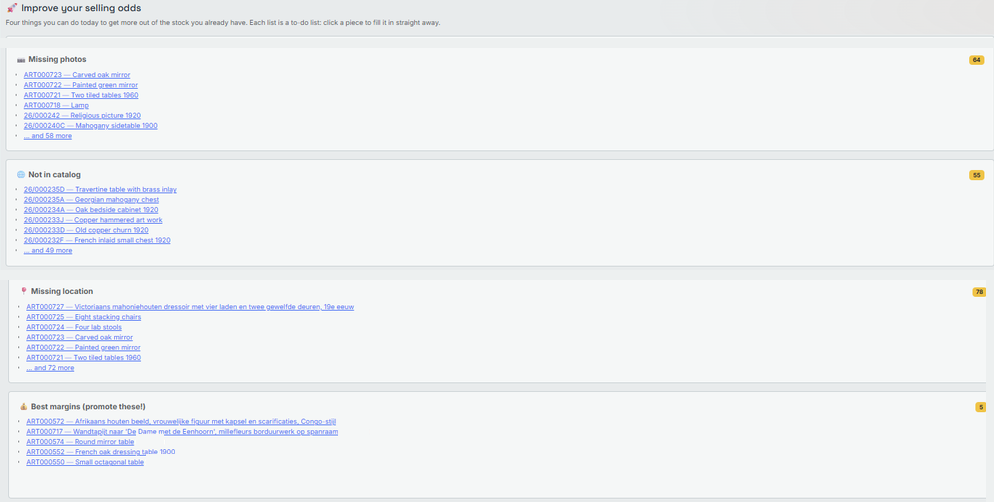
A screen from the app itself, with real pieces in it.
An inventory you make once a year tells you what you had last year. An inventory that keeps up tells you what you can do today.
Your closing stock is always there, with the purchase value per piece. A count is still useful to check that the shelf matches the screen, but you no longer need one to know what you have.
Yes. The dashboard shows which pieces have been sitting for months, which categories sell fastest, and where your stock value is tied up.
Yes, at any time, including during or after the trial. Your pieces stay yours: you can view and export everything, even without a subscription.
Work smarter, sell faster, and spend less time on paperwork.
30 days free, no card number. After that, 19.99 euro per month excluding VAT.